Showing posts with label Windows XP. Show all posts

Friday, March 18, 2011

Capture active window using “PrntScrn”

I don’t need to tell about well known Windows’s “PrntScrn” functionality Smile. Yes, it capture current screen and you can paste that any picture editing application.  There are many efficient and more powerful screen capturing tools are available, but Window’s “PrntScrn” option is most simple option without installing any third party software.

Most of the time we need to capture only Active window rather than complete screen. I am very happy to see there is already a way to capture only active window using Fn + Alt + “PrntScrn”


image

Fn + Alt + PrntScrn

Ctrl + V in Paint application

image

You can notice , only current active window gets captured ( pasted in Paint application).

Saturday, January 29, 2011

Make an executable searchable in Windows 7

I am very impressed with Windows 7 start search window. Its an one stop place to find all executable file on few key strokes.
2011-01-29_2245.png

I used to use Launchy application on Windows XP platform to get same kind of functionality.
Now my requirements have raised , being human being Smile, I want to make an executable appear in windows start search. I have found out how to get it done, just follow these steps
  1. Create shortcut of the executable file
  2. Copy it to C:\ProgramData\Microsoft\Windows\Start Menu\Programs
I have done the steps for Console, it comes to you as zip file and you just need to open .exe file. I have copied the .exe file in above mentioned “Start Menu” folder and result is here, I got Console in start search
2011-01-29_2257

Saturday, June 27, 2009

How to Cut mp3 files without using any third party tools in Windows XP/Vista

     There are many tools available to cut mp3 files, but most of them are either not free or not standard. There is a simple and easy way of doing this in Windows XP/Vista. Most of time XP/Vista comes with Windows Movie Maker software. If you don’t have this software then we can download this from http://www.microsoft.com/windowsxp/downloads/updates/moviemaker2.mspx.

You can cut any mp3/audio file using these few steps

1. Import mp3/audio file to Windows Movie Player using Audio/Music import option. You will see this option on left side menu as shown below

Audio Import

2. Drag and drop imported audio file to Audio Timeline.

2009-06-28_1035.png

3.You will find “Split” option on right bottom, it splits selected file into two parts from present selected location.
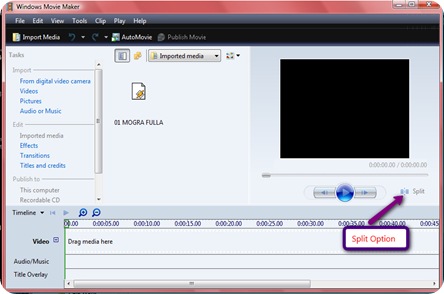
2009-06-28_1038.png

4.Now suppose you have to cut part of the 00:15 to 00:25 seconds. First select 00:25 second time line and split it into two using “Split” option. And then Select 00:15 and repeat same steps.

Fullscreen capture 6272009 40618 PM.bmp

Fullscreen capture 6272009 40659 PM.bmp5. Now delete unwanted front and end part. Select “Publish” option to save this cut clip.

2009-06-28_1058