Since I bought my first Android Phone I have been getting amazed with its features.

I got HTC Legend Android running phone with aluminum slick and unibody design. It got good AMOLED screen as well as 600 Mhz processor.
 Initially it comes with Éclair version of Android (2.1), there are plenty of applications are already part of this versions like Google Maps, GMail etc ..
But I am desperately waiting for Froyo update for following two main things
-
Live Wallpaper
-
Install to Memory Card
Recently HTC has relesed “Froyo” Android 2.2 update for all HTC Legends across Asia. I was very surprised with update process, I didn’t do anything except clicking “Update” button.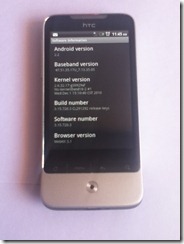 The update process took care each and everything seamlessly from backing up all personal data, settings to all installed applications. Just waiting of few minutes and here it is my phone is ready to use with “Froyo” update.
First thing I have noticed is the Live wallpaper. I have been waiting for this feature. There are few preinstalled live wallpapers, there are many free live wallpapers are available in app store. 
Next noticeable application is “Wi-Fi hotspot”. It facilitates sharing internet connection with other wi-fi enabled devices. It is very useful incase you have to share internet connection multiple devices.
The most important feature I have been waiting for is “Move to Card”. Till Éclair version of Android applications are allowed to install on phone memory only. It limits no of applications installed on the device. 
Now in this Froyo version applications can be moved to memory card, so you get more space in phone. But there is still some limitations, you can not move each and every application to SD Card, only featured applications can be moved. Featured means only if application provider has provided that feature with the application. Rest of applications has to be in phone memory. Anyway this will solve the memory limitation problem up to some extend.
Google has provided improved version of Google Maps, Google Search, Gmail etc applications. These apps have next level of features which will make user’s life more easy.
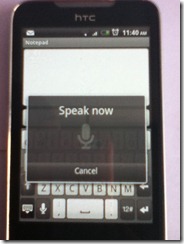
New way of interaction has been be introduced that is Speech to text. Now you can compose your message by just speaking to your phone. Now new option, looks like a mike, has been speak introduced in keyboard, which opens a speak recognition window for you. Just speak and it will convert whatever you speak into text. The same option is also provided over search window.